
Download BP Cozy – Health & Fitness, Blood Pressure Tracker, Personal Health Companion
Overview
BP Cozy is a free Android application designed to support users in monitoring their vital health metrics, with a particular focus on blood pressure and other key wellness indicators. The app positions itself as a personal health companion, aiming to simplify the daily tracking of essential health data. It is tailored for individuals interested in maintaining or improving their heart health through consistent, accessible monitoring. The application’s user-centric design makes it suitable for users of all ages, especially those managing hypertension or seeking proactive health management strategies.
By offering a streamlined interface, BP Cozy reduces the complexity often associated with health tracking tools, allowing users to record and review their readings with minimal effort. Its primary purpose is to turn routine health monitoring into a more engaging and less burdensome experience. The app operates entirely on the device, which aligns with its emphasis on privacy and data security. While the developer has not provided additional details about the organization behind the app, its functionality and focus on user autonomy suggest a commitment to personal wellness without reliance on cloud-based services.
Real-world usage scenarios include daily blood pressure checks for individuals with diagnosed conditions, preventive monitoring for those at risk, and general wellness tracking for users adopting healthier lifestyles. The app’s local data storage model supports offline usage, making it practical for users in areas with limited connectivity or those who prefer not to share health information online.
Key Features & Capabilities
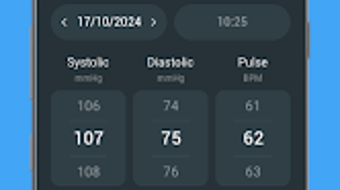
- Real-Time Blood Pressure Tracking – Users can log and monitor their blood pressure readings directly within the app, enabling consistent tracking over time.
- Local Data Storage – All health data is stored securely on the device, ensuring user privacy and eliminating reliance on external servers.
- Intuitive User Interface – The app features a clean, easy-to-navigate layout designed for accessibility across age groups and technical skill levels.
- Health Metric Visualization – Users can view historical data through charts and graphs to identify trends and patterns in their readings.
- Custom Reminders – The app allows users to set personalized alerts for regular monitoring, promoting consistent usage and routine care.
These features collectively support proactive health management. For example, a user with elevated blood pressure can use the tracking and visualization tools to observe fluctuations and correlate them with lifestyle factors such as diet or stress. The reminder system helps maintain consistency, which is crucial for accurate long-term monitoring. The local safeguard ensures that sensitive health data remains under the user’s control, addressing growing concerns around digital privacy in health apps. This approach also supports uninterrupted use during travel or in low-connectivity environments.
User Interface, Workflow & Performance
BP Cozy presents a minimalistic interface focused on usability and clarity. Navigation is straightforward, with core functions such as logging a new reading, viewing history, and setting reminders accessible from the main screen. The layout emphasizes readability, with large, legible text and intuitive icons that guide users through each step of the process.
The workflow is designed to minimize friction: users can input data with just a few taps, and results are displayed immediately. The app’s responsiveness appears consistent with typical Android applications, though specific performance benchmarks were not provided by the developer. The developer did not specify resource usage details, so general observations about CPU and RAM behavior are based on standard Android app patterns.
Stability appears to be a priority, as the app operates without requiring constant internet access. This offline capability contributes to a smooth user experience, particularly for individuals who rely on the app for daily health management. The absence of cloud synchronization reduces potential points of failure and ensures that data remains accessible even during network outages.
Compatibility & System Requirements
BP Cozy is designed for Android devices and is compatible with the latest versions of the operating system. The app is available in version 1.0.2 and has a file size of 15.6 MB, indicating a lightweight footprint that should not strain device storage.
Exact system requirements were not listed, so compatibility with older Android versions cannot be confirmed. The developer did not provide details about minimum hardware specifications such as RAM, processor, or storage space. As such, users are advised to check their device’s compatibility through the Google Play Store or official distribution channel.
Installation is straightforward, and the app does not require root access or special permissions beyond those typically needed for basic functionality. This makes it accessible to a broad audience of Android users seeking a simple, secure health tool.
Pros and Cons
Pros
- Free to download and use with no hidden costs
- Local data storage ensures privacy and security
- Simple, intuitive interface suitable for all ages
- Offline functionality allows use without internet access
- Lightweight installation at just 15.6 MB
Cons
- No cloud backup or synchronization across devices
- Limited to Android platform
- Exact system requirements not specified
- No integration with wearable health devices
- Feature set may be basic for advanced users
FAQ Section
Is BP Cozy available for iOS devices?
As of the latest release, BP Cozy is only available for Android devices. There is no official version for iOS.
Does BP Cozy require an internet connection to function?
No, the app operates fully offline. All data is stored locally on the device, allowing users to log and view readings without an active internet connection.
Is my health data safe with BP Cozy?
Yes, the app uses a local safeguard to store all user data directly on the device. This means your health information is not transmitted to external servers, enhancing privacy and security.
How often should I update BP Cozy?
It is recommended to keep the app updated to the latest version to ensure optimal performance and access to new features. Updates are available through the official distribution channel.
Can I use BP Cozy without creating an account?
Yes, BP Cozy does not require registration or account creation. Users can start tracking their health metrics immediately after installation.
Final Thoughts + CTA
BP Cozy stands out as a reliable, privacy-focused tool for individuals seeking to monitor their blood pressure and overall health in a simple, secure way. Its lightweight design, intuitive interface, and commitment to local data storage make it an ideal choice for users who value control over their personal health information. While it lacks advanced integrations and cross-device sync, its core functionality is well-executed and purpose-built.
Those who prioritize data privacy, ease of use, and consistent tracking will benefit most from this app. It is especially suitable for older adults or individuals managing chronic conditions who prefer a no-frills, dependable solution.
Download BP Cozy now and take the next step toward proactive heart health management.




.png)


